Bootable USB Flash Drive (UFD) FAQ
How do I update the software on my UFD?
- Updates for the software on the Bootable USB Flash Drive are available here.
How does licensing work for software on the UFD?
- Every UFD purchase comes with a single-user license for all software on the UFD. The single-user license enables one user to be using one copy of the software at any one time. Users can freely move their bootable UFD between machines as there is no need to install software. The software itself is locked to the UFD which means that users do not need to register their software, simply plug and play to access.
Can PassMark provide a replacement UFD?
- If your UFD has been lost, misplaced or damaged, please contact us with your order number or details about your original purchase. We can provide you with a quotation for a replacement UFD over the next working day.
My UFD is defective. Does the UFD come with warranty?
- As with all PassMark hardware, the Bootable UFD comes with a 180 day warranty for manufacturer or material defects. For all replacements under warranty, please refer to our Refund Policy.
Can I purchase a backup unit of the UFD?
- Yes, PassMark can provide existing customers with a backup UFD unit on request (one per UFD purchased). Please contact us and we will provide a quotation for a backup UFD.
Can I purchase the UFD seperately?
- Yes, the UFD can now be purchased separately from the PC Test Kit here.
Can I make a backup copy of the files on the Bootable UFD?
-
If the Bootable UFD is critical to your business operations, we strongly recommend purchasing a back up unit (please see the next question below). At the moment, there are two considerations with making a backup of the Bootable UFD:
- The software on the UFD is pre-loaded and locked to the UFD, so unfortunately, the backup would be of little use should the drive become damaged or misplaced.
- The UFD (Version 3 and older) comes with a licensed copy of WinPE to enable BurnInTest Bootable Pro to run. WindowsPE is not free software, and PassMark pay royalties to Microsoft for every UFD sold to our customers. As a result of this, there may be legal and technical issues with making a copy, image or backup of the drive.
My UFD has stopped booting correctly and I see the error message "Warning: /dev/disk/by-label/LIVE does not exist"
- If you have changed the volume name of the UFD then it will not be able to boot correctly, rename it back to "LIVE" and it should be able to boot correctly again.
My UFD isn't booting correctly and stops at "Looking for slax data"
-
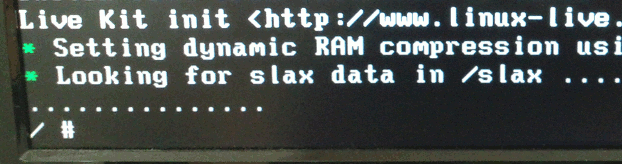
- We have seen this error occur on some older (slower) systems where the UFD will not boot (or intermittently boot). This seems to be related to the speed of the UFD re-enumerating after a device driver load/change when the system is booting, which on some systems will be much slower than normal and cause a timeout.
- Similar errors can occur when using the old WinPE base image, the boot process will succeed but will then fail with a licensing error message as the UFD is not detected properly once the system has booted.
- We currently know of no workaround for this situation other than updating to the latest image and trying this as it uses a different version of Linux to boot (Porteus).
How does BurnInTest Bootable differ from BurnInTest Windows?
- BurnInTest Bootable is a version of BurnInTest that does not require a working or existing Operating System to be installed on the PC to work; simply plug the UFD in and boot from the drive to get started, no additional configuration is required. Some of the tests available in BurnInTest Windows are not available in BurnInTest Bootable as some device drivers are not installed. For more information about how the differences between BurnInTest editions, please see the BurnInTest Edition Comparison Table.
The UFD won't boot on my system and I see the erorr "Current Input Timing not supported by Monitor Display"
- Newer video cards are often not supported in Linux very well initially so there are cases where the correctly supported monitor resolution and settings cannot be determined. If this happens try changing output type (eg HDMI or VGA) or the monitor in use. In some cases it may be necessary to switch the video card to an older model (in a case we saw from a GTX1060 to the on-board Intel graphics).
The UFD won't boot on my system and I have a Matrox graphics card
- Currently Matrox graphics cards are unsupported by the Linux distribution used (Porteus) and trying to boot on a system with a Matrox graphics card will fail.
Is the WinPE version of the UFD still available?
-
We currently only offer a bootable UFD that boots to Linux with BurnInTest Linux as Microsoft no longer licenses WinPE for this type of usage anymore. For more information for why we cannot offer a WinPE bootable UFD anymore, see here. The rest of the software (including BurnInTest Windows) in the UFD will need to be run on a system with Windows installed.
If you need a bootable BurnInTest Windows using WinPE, please purchase the license here and follow the guides here under Documentation.